 FreeSeedFinder
How to Use a Minecraft Seed Map (Java Edition)
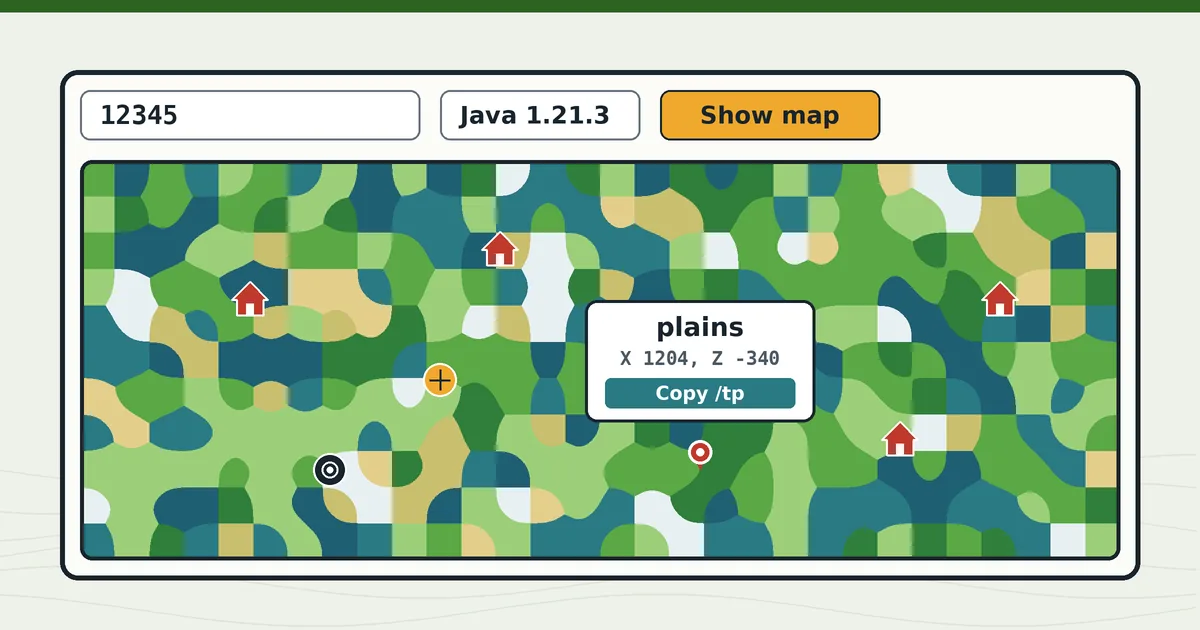
A seed map shows what a Minecraft world looks like before you explore it: biomes, villages, strongholds and the spawn point, all drawn from a seed number. Used well, it saves hours of searching. Used carelessly, it sends you to the wrong place. This guide shows how to set a seed map up correctly, read its coordinates, find what you want and confirm the result in your own game. The steps use our free seed map for Java Edition, and most of them apply to any seed map.
Enter your seed, choose the exact Java version your world was created in, then read the X and Z coordinates from the map and travel there. Confirm each result in the game with the F3 screen or the /locate command, because a map estimates some features.
What a seed map shows and what it does not
A seed map is a calculator. It runs Minecraft's world generation rules for a seed and draws the result, so it can show places you have never visited. A good map draws four things: biomes such as plains, desert or mushroom fields, structure positions such as villages and ocean monuments, the strongholds, and an estimated world spawn.
It does not show your builds, items, mobs or any change made after the world was created. It also cannot show every block, so tall terrain, caves and the inside of structures stay hidden. Treat the map as a planning tool and the game as the final check.
Match three settings before you start
Most wrong results come from a mismatch in one of these settings, not from the seed.
| Setting | Why it matters | Where to check |
|---|---|---|
| Edition | Java and Bedrock place structures differently, so a Java map cannot show Bedrock villages | Your launcher or the game's title screen |
| Version | New game drops add biomes and change generation | The launcher installation name or the F3 screen |
| World type | Large Biomes stretches every biome, and mods or data packs can change generation | The world creation screen |
Our guides on Java vs Bedrock seeds and Minecraft version numbers explain the first two in detail, and the mismatch checklist covers the rest.
How to set up and read the map
- Get your seed. Run
/seedin Java Edition, or follow our guide on how to find your Minecraft seed if you cannot open the world. - Enter it. Type the number in the seed box, choose the Java version, tick Large Biomes if you used that world type, and press Show map.
- Choose a height. The View at setting picks the height the map reads. Surface (Y=320) shows what you see from above and suits planning. Sea level (Y=63) and Underground (Y=0) show the biome at those heights, including caves.
- Move and zoom. Drag the map, use the plus and minus buttons, or click the map and use the mouse wheel. Full screen gives you more room.
- Read the coordinates. The bar at the top shows the biome and the X and Z under your pointer. The grid labels show the same numbers along the edges.
- Drop a pin. Click any spot to see its biome, copy a
/tpcommand or open the biome's wiki page. Click several places to compare them. - Switch layers on. Turn on spawn, strongholds and the structure types you need. Villages and other structures appear when you zoom in close enough.
- Share your view. The Share link button copies a link that reopens the same seed, version and position.
How to read what you see
Coordinates and the grid
X runs east to west and Z runs north to south, with north at the top of the map, which is negative Z. The lines labelled x = 0 and z = 0 cross at the world origin. A pin at X 1200, Z -340 is 1,200 blocks east and 340 blocks north of the origin.
Biome colours and the height setting
Since Java 1.18, biomes depend on height as well as position, so a cave biome such as dripstone caves can sit under a mountain. If you read the map at sea level, those underground biomes show up as patches in the middle of surface biomes. The Surface setting avoids that, and the other settings help when you want to find caves.
Markers and estimates
A house marks a village, an eye marks a stronghold and a target marks the world spawn. Spawn is an estimate because the game searches for a suitable block near the origin, and structures can occasionally be shown where the game fails to generate them. Both limits are normal for seed maps.
Why zoomed-out views look simpler
When you zoom out, each square shows the most common biome in a larger area, so small patches disappear. Zoom in to see them. Structure markers appear only when you are close enough, which keeps the map readable.
Find a village, a biome or a stronghold
A village near spawn. Turn on the Village layer, zoom in around the spawn marker and click the nearest house. Copy the /tp command, or note the coordinates. To check it in the game, run /locate structure #minecraft:village and compare the result.
A particular biome. Use Highlight biome to pick the biome you want and fade everything else. Zoom out until you see the nearest patch, then click it for coordinates. In the game, /locate biome minecraft:cherry_grove finds the nearest cherry grove, and the Minecraft Wiki says biome searches cover a limited radius, so a far patch may not be found.
A stronghold. Turn on the Strongholds layer. The nearest ones sit in the first ring around the origin. To confirm one without cheats, throw eyes of ender and use the stronghold locator. The /locate command needs cheats enabled in a single-player world.
Check the map against your game in five minutes
- Create a spare Creative world with the same seed, Java version and world type.
- Pick three to five spots far apart on the map and note their X and Z.
- Teleport with
/tp @s X Y Z, using the same height as the map's View at setting (for example Y=320 for Surface). - Press F3 and read the Biome line. Compare it with the biome the map showed.
- Run
/locatefor the nearest village and stronghold and compare them with the nearest markers.
If everything matches, you can trust the map for that world. If not, work through the mismatch checklist before you blame the seed.
When a seed map can be wrong
- The version is newer than the map. As of 10 November 2026, our map supports Java versions up to 1.21.3, while the current game is 26.3. New biomes added in 26.x can change what generates in some areas.
- Structures are predicted, not checked block by block. The Cubiomes library behind many maps says it cannot check individual blocks, so a few markers may be false.
- Spawn is an estimate. Do not use it as proof that a seed is wrong.
- Mods and data packs change generation. A normal map cannot know about them.
- Bedrock is different. Terrain and biomes match for current seeds, but structures do not.
Tips for using a seed map faster
- Start at spawn and widen the search, because places near spawn are the easiest to reach.
- Enable only the layers you need. Fewer markers make the best route easier to judge.
- Keep pins on your candidate spots, then compare them with the biome names in their labels.
- Save the share link with your notes so you and your friends can reopen the same view.
Frequently asked questions
How accurate is a Minecraft seed map?
Biomes are very reliable for the versions the map supports, because the map reproduces the game generator. Structure markers can include a few false positives and the spawn point is an estimate, so confirm important spots in the game.
Can I use a Java seed map for Bedrock Edition?
Only for terrain and biomes. For current seeds Java and Bedrock match on land and biomes, but villages, strongholds and other structures sit in different places, so a Java map cannot guide you to Bedrock structures.
Why can I not see villages on the map?
Switch the Village layer on and zoom in. Structure markers are hidden when you are zoomed far out so the map stays readable. Some seeds also have few villages near spawn.
What do the X and Z numbers on the map mean?
X is the east and west position and Z is the north and south position, measured in blocks from the world origin. North is the top of the map, which is negative Z.
How do I find the nearest village without a seed map?
Run /locate structure #minecraft:village in a world where cheats are enabled. The game prints the nearest village coordinates, and a seed map helps you compare several places at once.