 FreeSeedFinder
Minecraft Version Numbers Explained: What 26.1, 26.2 and 26.3 Mean
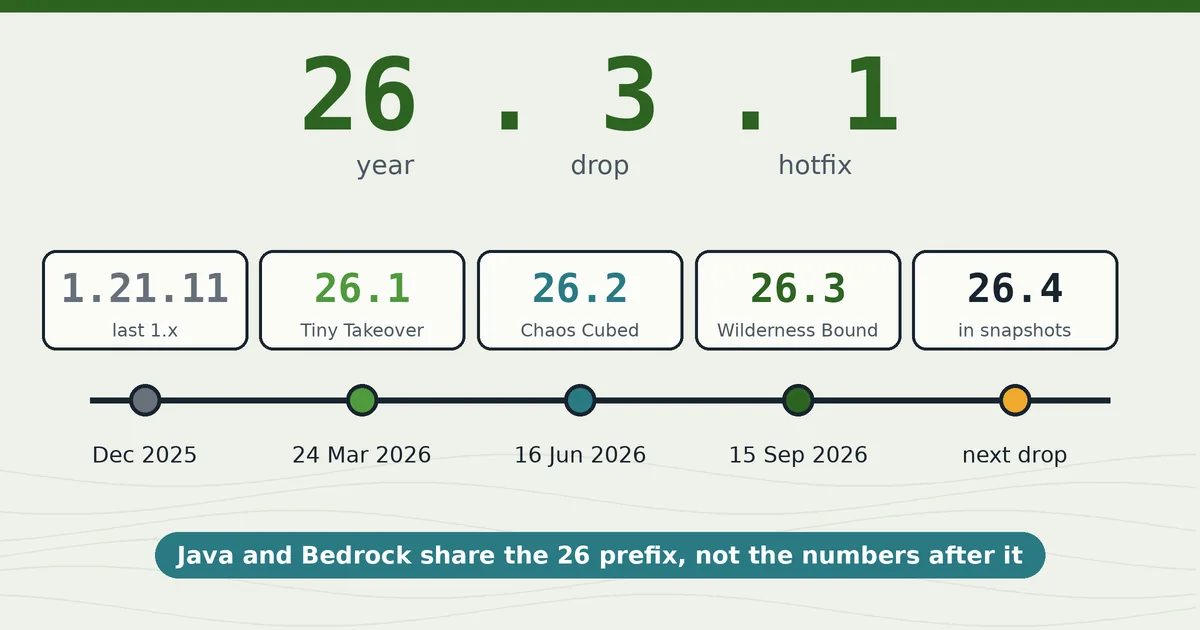
If you are looking for Minecraft 1.22, you will not find it. In 2026 Mojang changed the version numbers so that they follow the calendar year, and the newest Java release is now 26.3. This guide explains how to read the new numbers, lists every release since the change with its date, and shows why the version matters when you share or look up a seed. It is based on Mojang's announcement and release notes and was last checked on 10 November 2026.
Java Edition versions now follow year.drop.hotfix. In 26.3, 26 is the year, 3 is the third game drop of 2026, and a third number such as 26.1.1 marks a hotfix. The last version with the old numbering was 1.21.11.
How to read a 26.x version number
| Part | Meaning | Example |
|---|---|---|
| Year | The last two digits of the release year | 26 for 2026 |
| Drop | Which game drop of that year it is | 26.3 is the third drop |
| Hotfix | A bug-fix release between drops, shown only when needed | 26.1.1 |
Mojang announced the change on 2 December 2025. The old numbers made a large content drop look like a small patch, so players could not tell updates apart at a glance. The new format shows the year and the drop at once, and it applies to both editions, although the numbers that follow the year differ between them.
Java releases since the change
| Version | Drop name | Released | Notes |
|---|---|---|---|
| 1.21.11 | Last 1.x drop | 9 December 2025 | The last release with the old numbering |
| 26.1 | Tiny Takeover | 24 March 2026 | First drop under the new numbering |
| 26.1.1 and 26.1.2 | Hotfixes | April 2026 | Bug fixes |
| 26.2 | Chaos Cubed | 16 June 2026 | Added the Sulfur Caves biome |
| 26.3 | Wilderness Bound | 15 September 2026 | Added the Dappled Forest biome; the current release |
| 26.4 | In testing | Not released | Appears in snapshots |
The release notes for 26.1, 26.2 and 26.3 are on minecraft.net, and the dates above match Mojang's version manifest. Where a date is not published, we say so instead of guessing.
Java and Bedrock use different numbers
Both editions start with 26 in 2026, but Bedrock counts more releases, so its second number grows faster. Compare editions by drop name, not by the digits.
| Drop | Java Edition | Bedrock Edition |
|---|---|---|
| Tiny Takeover | 26.1 | 26.10 |
| Chaos Cubed | 26.2 | 26.30 |
| Wilderness Bound | 26.3 | 26.50 |
Bedrock releases in between, such as 26.20 and 26.40, are not game drops. The Bedrock column comes from third-party summaries of Mojang's changelogs, so check the drop name in your own game when it matters.
Why the version matters for seeds
A seed gives the same world only when the edition and version match. When a drop adds a biome, the game can place that biome in areas where an older version generated something else. The 26.2 drop added the Sulfur Caves biome and 26.3 added the Dappled Forest biome, so a world created in 26.3 can differ from a map of 1.21.x in the places where those biomes appear.
That has three practical effects:
- When you share a seed, add the exact version, for example "Java 26.3, seed 12345".
- When you use a seed tool, pick the version your world was created in, not the newest one. If a tool does not list your version, expect small differences in new-biome areas. Our seed map shows the newest version it supports under the seed box.
- When something looks different, check the version before you doubt the seed, using the mismatch checklist.
How to find your world's version
In Java Edition, the launcher installation name shows the version you play, and the top-left line of the F3 debug screen starts with the game version. If you cannot open the world, our world file seed reader shows the game version stored in the file when the file includes it. On a server or Realm, ask the administrator.
Snapshots, hotfixes and updating safely
Snapshots are test builds named after the drop they lead to, for example 26.4-snapshot-7 for the seventh test build of the fourth 2026 drop. Do not open a world you want to keep in a snapshot. After a world is opened in a newer version, you cannot open it in an older one, so back up the world folder before you update. Java 26.1 and later also need Java 25, which the official launcher provides.
Which version should you choose?
- A new world: the latest release, unless you want to use a particular seed map or mod.
- A seed from a video or friend: the version they used. Ask for it, and see what a screenshot can and cannot tell you.
- A modded world: the version your mod loader supports.
If you are new to the topic, start with what a Minecraft seed is, then use the seed map guide to explore it.
Frequently asked questions
Is there a Minecraft 1.22?
No. Mojang moved to year-based numbers in 2026, so the releases after 1.21.11 are 26.1, 26.2 and 26.3. A future drop will be numbered by its year and drop, not as 1.22.
What is the latest Minecraft Java version?
As of 10 November 2026 it is 26.3, called Wilderness Bound, released on 15 September 2026. The next drop, 26.4, is still in snapshots.
Is 26.1.2 the same as 26.2?
No. 26.1.2 is a hotfix for the first drop of 2026, while 26.2 is the second game drop with new content. The third number marks a bug-fix release.
Do Java and Bedrock use the same version numbers?
They share the 26 prefix, but the numbers after it differ. For example, the drop that is Java 26.3 is Bedrock 26.50, so compare editions by drop name.
Does my seed change when the version changes?
The number stays the same, but the world it generates can change where a drop added new biomes. Always note the version next to your seed.
Sources
- Minecraft.net: Minecraft is changing its version numbering system
- Minecraft.net: Java Edition 26.1 release notes
- Minecraft.net: Java Edition 26.2 release notes
- Minecraft.net: Java Edition 26.3 release notes
- Mojang version manifest (release dates)
- Space-Node: Minecraft 26 version numbers explained (Bedrock drop numbers)